
Managing the Projector Plus Subscription
New Projector Plus subscriptions are managed through WorshipStorm Cloud — a customer portal you open from inside the app. A subscription belongs to your Planning Center Services organization and covers everyone in it; the Planning Center user who purchased it is recorded as its manager, so the subscription and the person responsible for it are one identifiable record. Any Planning Center user in your organization can purchase one — no particular permission level is needed.
App Store subscriptions purchased through Projector Classic are honored in full, including Premium features, and you may stay on one indefinitely. Those are covered at the bottom of this article.
Viewing your subscription
Any device running Projector Plus, signed in as any of your Planning Center Services users, can view the organization’s subscription. Choose Settings -> Your Plan:

Tap the row to open it. While a trial is running the screen is headed Free Trial and shows the days remaining, the date it expires, and Manage Subscription:
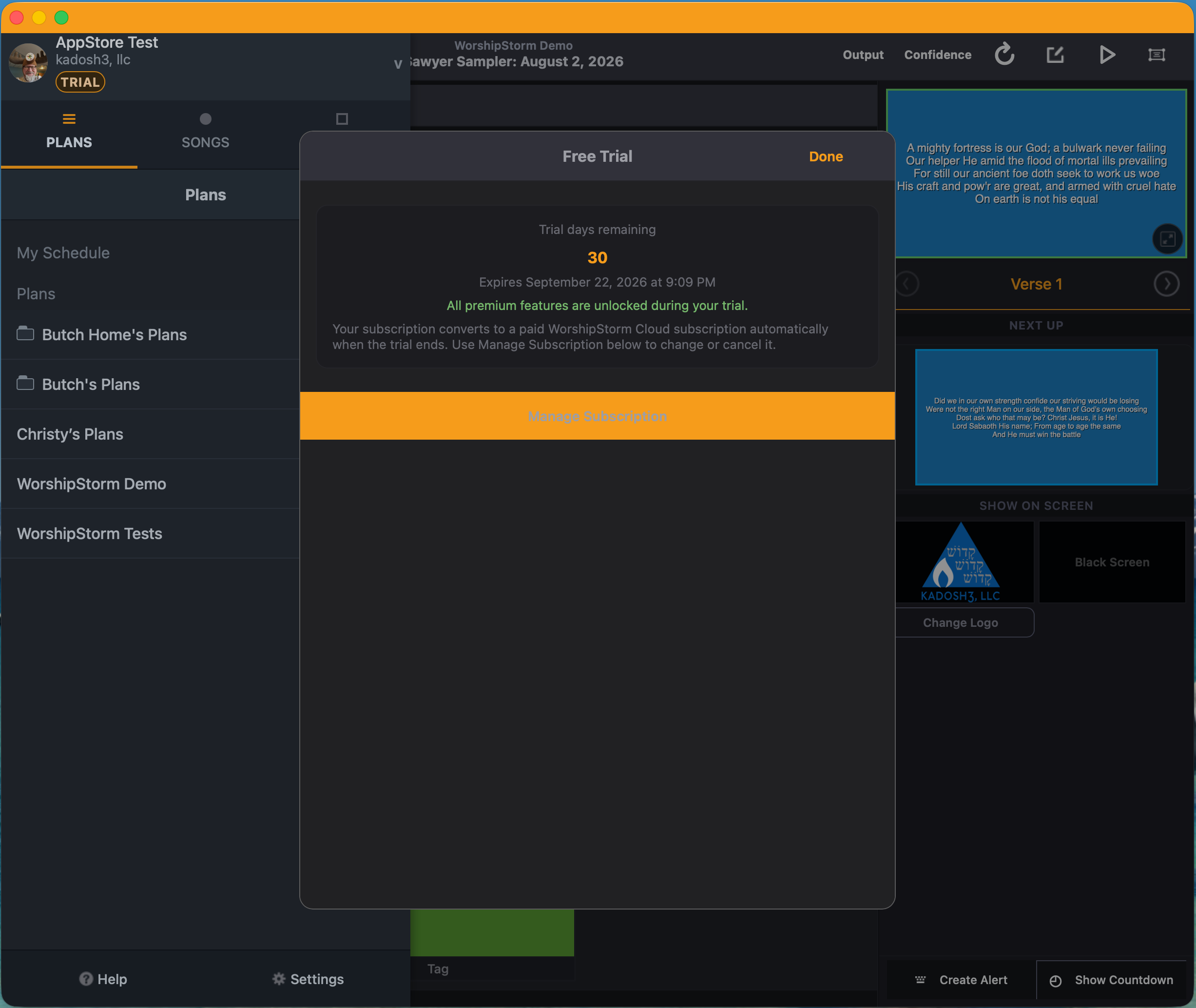
Once the trial converts, the same row opens the WorshipStorm Cloud Subscription screen, which shows the plan, the billing email on the account and the renewal date in place of the countdown.
If somebody else in your organization set the subscription up, the screen names them — so working out who to ask is a matter of reading it. As the purchaser you see the Manage Subscription button instead, which is the more useful answer.
Opening the customer portal
Tap Manage Subscription on the Subscription Details screen.
The button opens the billing portal straight away, in a separate window with Projector Plus still open behind it. You signed in with Planning Center to reach this screen, so there is no second password and nothing to look up.
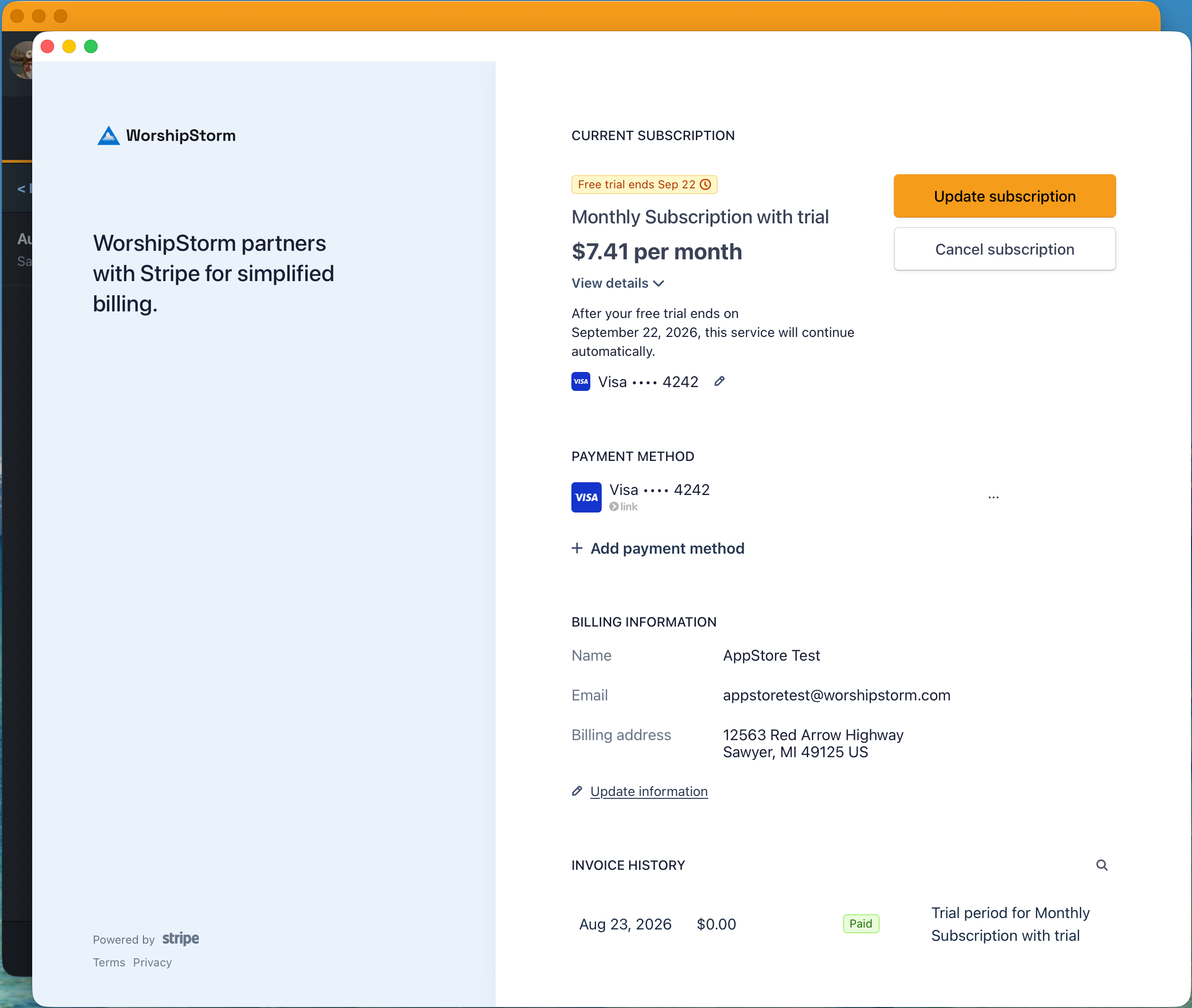
From the portal you can:
- Update subscription — switch between monthly and yearly, either direction
- Payment method — add a card, or replace an expiring or declined one
- Cancel subscription — it stays active until the end of the paid term
- Billing information — the name, email and address on the account
- Invoice history — past payments, each one openable as a receipt for your church’s records
The price the portal shows includes tax
The portal headlines the total including tax, so it can read higher than the $6.99 or $71.99 you chose at checkout. View details breaks it down:
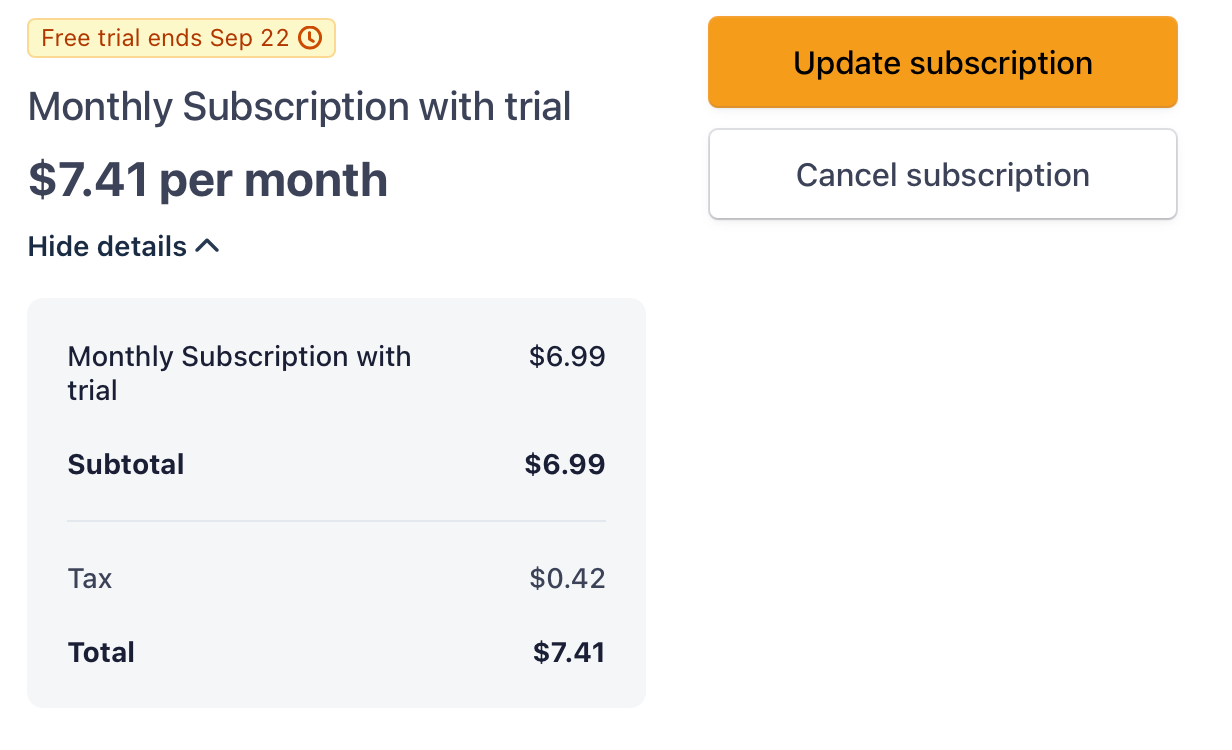
The subtotal is the plan price, and the tax line is what your location adds. Nothing has changed about the plan you bought.
During the free trial there are no real charges yet, so you may see a $0.00 line dated when the subscription started. That is the trial itself, not a payment, and it is not a fault. Actual payments appear once billing begins. If you need a receipt you cannot find — or you are the person who keeps the books rather than the person who set the subscription up, and so cannot open the portal yourself — contact WorshipStorm support and we will retrieve it from our side.
For anything else about the account, contact support as well.
On iPhone, iPad and Android
Viewing the subscription works the same everywhere: Settings → Your Plan shows the plan, the billing email and the renewal date on any device, signed in as any user in your organization.
Changing it happens in Projector Plus in a browser, where Manage Subscription opens the portal. That is the one route we support — go through the app rather than through a link in a receipt email, which comes from Link rather than from us and manages the payment rather than the subscription.
Switching between monthly and yearly
Use Update subscription in the portal. You can move either way yourself — you do not need to cancel and start again, and you should not. Cancelling ends the subscription at the end of the term; it does not move you onto the other plan.
Monthly to yearly is offered in the portal. ⚠️ If you are still in your free 30 days, the change is scheduled for the day the trial ends rather than applying straight away — your trial is not cut short, and you are not charged on the spot. Yearly works out cheaper over twelve months.
Yearly to monthly is available in the same place and takes effect at your next renewal, not immediately. Projector Plus keeps running in the meantime. If your circumstances change, moving to monthly is the alternative to cancelling, not a step towards it.
Ask us before you switch if the money matters to the timing — what happens to a part-paid month, and what you are charged and when, depends on where you are in your term.
If the owner has left the church, contact WorshipStorm support before doing anything else — and in particular, don’t start a second subscription. There is usually a way forward, and a duplicate subscription makes every one of them harder to sort out.
Cancelling
Cancel from the customer portal. The subscription will not auto-renew at the end of the current term, but stays active until the expiration date — you don’t lose access immediately.
When a subscription expires
Expiry is not immediate loss of access. A 28-day grace period starts when the subscription lapses, and premium keeps working for the whole of it — editing, attaching new media, custom layouts, Quick Song, Sessions and Viewer broadcast all continue. The window exists to absorb a failed renewal, so a declined card cannot cost you a service.
A Subscription Expired screen offers Subscribe Again, and reappears on login and when the app returns to the foreground — at most once every four hours. It is a warning rather than a lockout, and can be dismissed with Continue for Now. The details screen shows a Grace Period Expires date, so you can see exactly how long you have.
Renew within those 28 days and there is no interruption at all. If the grace period does end, Projector Plus moves to the free tier — you keep plan browsing and slide presentation, and lose the premium workflow. Any custom layouts already applied to plan items fall back to the built-in layouts. Nothing further happens after that: Projector Plus does not become blocking and does not log you out. It keeps running on the free tier for as long as you like.
See Subscription lifecycle for what each state looks like on device, or Subscription Troubleshooting if a subscription you have paid for isn’t being recognized.
App Store subscriptions from Projector Classic
If your organization subscribed through Projector Classic on the App Store, that subscription is honored in Projector Plus — Premium features included. You do not need to purchase again, and you should not. You can keep the Apple subscription for as long as you want it; there’s no deadline to move and no price difference.
Settings → Your Plan looks exactly the same as it would for a WorshipStorm Cloud subscription — Projector Plus Premium — All features unlocked:
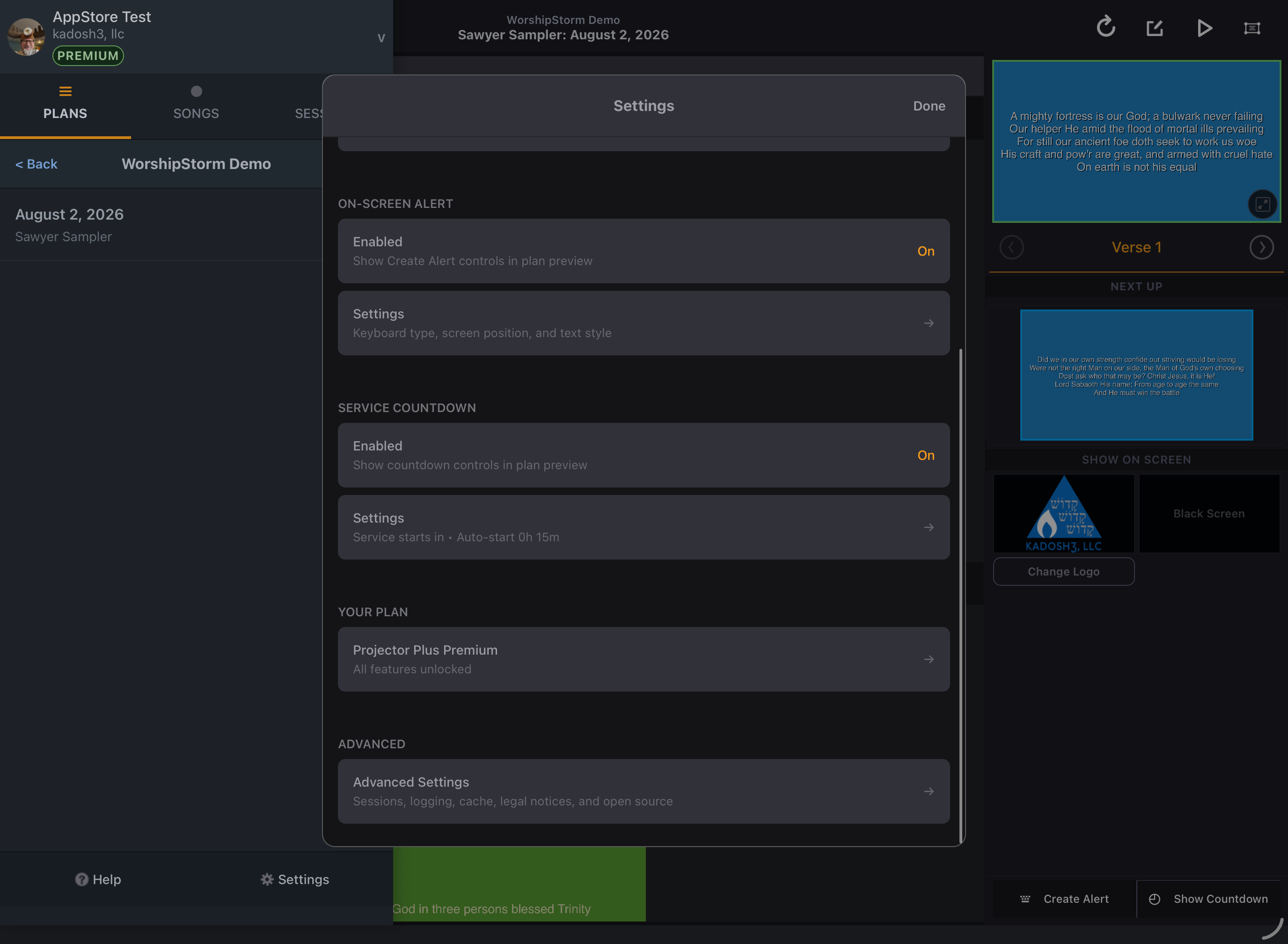
Open it and the screen is headed WorshipStorm Cloud Subscription whichever kind you hold — that heading is the section of the app, not a statement about your subscription. What identifies an App Store subscription is the green panel inside it, which names the type in full:
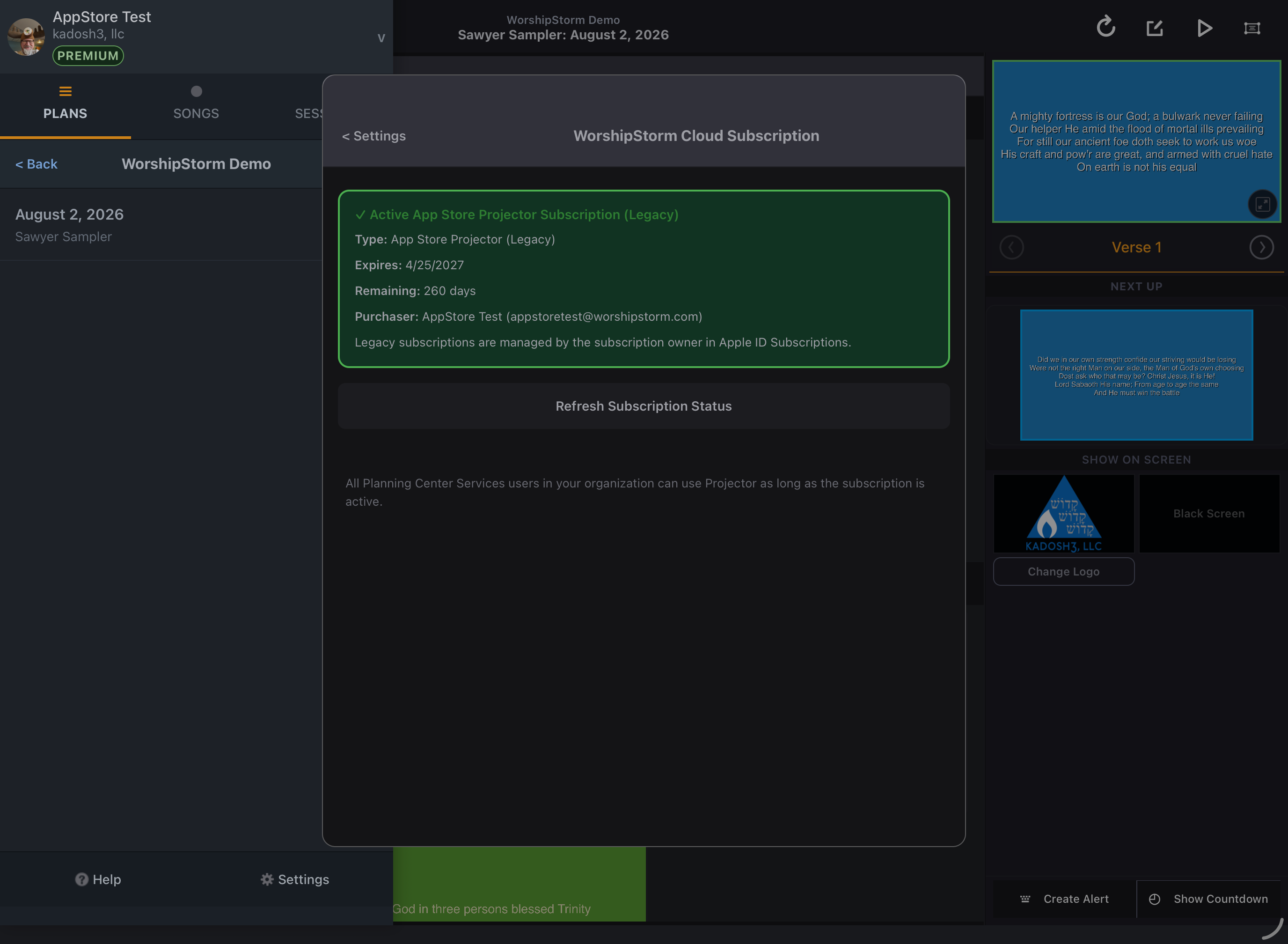
- ✓ Active App Store Projector Subscription (Legacy) as the panel’s heading
- Type: App Store Projector (Legacy)
An App Store subscription continues to be managed by Apple, not by the WorshipStorm Cloud portal — and not from inside Projector Plus. The Subscription Details screen shows the subscription and then says so:
Legacy subscriptions are managed by the subscription owner in Apple ID Subscriptions.
There is no Manage Subscription button for an App Store subscription in Projector Plus, on any device. (Projector Classic does offer one when the device is signed into the owning Apple ID; Projector Plus does not.) Manage it through Apple instead:
- On iOS/iPadOS: Settings -> Apple Account -> Subscriptions
- On macOS: System Settings -> Apple Account -> Media & Purchases -> Manage
- Choose WorshipStorm Projector in that list
This has to be done by whoever is signed into the Apple ID that owns the subscription, which is the ownership problem described below in one sentence.
Should we switch to WorshipStorm Cloud?
The reason to switch is simplicity of ownership.
An App Store subscription is owned by the Apple ID that bought it. That Apple ID frequently isn’t a Planning Center user at all — it’s a volunteer’s personal account, a shared device login, or the tech director’s own ID. Nothing connects it to your organization’s Planning Center roster. Years of support conversations have started with some version of “we pay for this, but nobody knows which account it’s on.”
A WorshipStorm Cloud subscription belongs to your organization, and names the Planning Center user who bought it as its manager. That person is visible in the app, the portal opens from inside Projector Plus for whoever holds that role, the role can be moved to a different Planning Center user, and nothing depends on anyone still having access to a particular Apple ID.
The list price is the same either way — $6.99 monthly, $71.99 annually. The decision is about who controls the subscription.
If your Apple ID owner is still around and everything works, staying put is fine — we’re not going to stop honoring it. Switch when ownership is the problem: the buyer has left, nobody remembers which Apple ID it was, or the person who owns it isn’t the person who should.
To switch: cancel the App Store subscription, let it run to the end of its paid term, then subscribe through WorshipStorm Cloud. Don’t run both at once.
We cannot move remaining paid time across. Apple holds that subscription, and there is no mechanism for us to credit or transfer what is left of it — so the wait is real, and it is the reason to think about timing. If the changeover matters to you, cancel shortly before a renewal rather than shortly after, so you are not waiting out a term you have just paid for.
Switching does not include the free trial. Those 30 days are offered only to organizations that have never had a trial, and an organization that has used Projector Classic has already had one. You are not losing anything by moving — the trial was spent years ago — but it is worth knowing before you compare the two prices.